Operations & Maintenance
Chapter 12 — Ongoing operations, maintenance procedures, tuning, and support resources for NTA/AD systems
12.1 Day-to-Day Operations Overview
Effective NTA/AD operations require a structured daily, weekly, and monthly operational rhythm that covers alert triage, system health monitoring, rule tuning, threat intelligence updates, and capacity management. The SOC team responsible for NTA/AD operations must have clearly defined roles, runbooks for common alert types, and escalation procedures for high-severity incidents. The support and knowledge base environment shown below represents the operational infrastructure required to sustain an effective NTA/AD program.
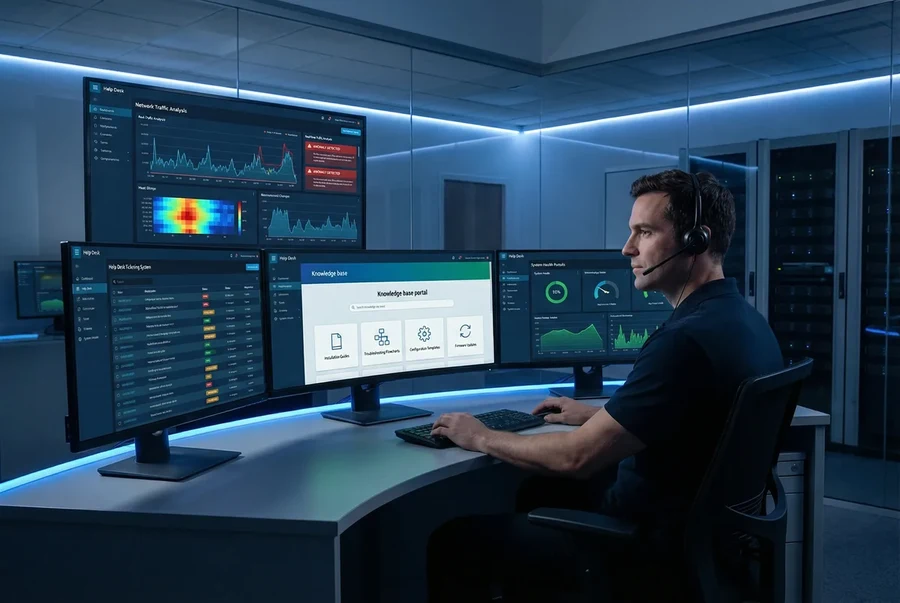
Figure 12.1: NTA/AD operations environment showing a SOC analyst workstation with multiple monitors displaying the NTA analytics dashboard, alert ticketing system, knowledge base portal (with installation guides, troubleshooting flowcharts, configuration templates, and firmware update notifications), and system health metrics — representing the complete operational support ecosystem required for sustained NTA/AD program effectiveness.
12.2 Operational Maintenance Schedule
A structured maintenance schedule ensures that the NTA/AD system remains current, optimally tuned, and operationally effective. The schedule below defines the recommended maintenance activities, their frequency, and the responsible team. All maintenance activities must be logged in the change management system and reviewed during monthly operational reviews.
| Frequency |
Activity |
Responsible Team |
Estimated Duration |
Notes |
| Daily |
| Daily |
Review and triage all open alerts; close false positives with documentation |
SOC Tier 1 |
1–2 hours |
Use SOAR playbooks for common alert types |
| Daily |
Check system health dashboard: CPU, memory, disk, packet drop rate |
SOC Tier 1 |
15 minutes |
Alert if any metric exceeds 80% threshold |
| Daily |
Verify threat intelligence feed last-update timestamps |
SOC Tier 1 |
5 minutes |
Escalate if any feed is > 24 hours stale |
| Weekly |
| Weekly |
Review top-10 alert sources; identify and suppress confirmed false positive patterns |
SOC Tier 2 |
2 hours |
Document all suppression rules with expiry dates |
| Weekly |
Review storage utilization and project capacity runway |
Infrastructure |
30 minutes |
Order additional storage if runway < 30 days |
| Weekly |
Review and update network asset inventory in NTA platform |
SOC Tier 2 |
1 hour |
Add new assets, retire decommissioned systems |
| Monthly |
| Monthly |
Apply software updates and signature rule set updates |
Infrastructure |
2–4 hours |
Test in staging environment first; schedule maintenance window |
| Monthly |
Run detection validation test suite against known-bad PCAP samples |
SOC Tier 2 |
2 hours |
Verify detection rate ≥ 95% for included test cases |
| Monthly |
Review and update detection baselines for behavioral anomaly models |
SOC Tier 2 |
1 hour |
Retrain models if network topology has changed significantly |
| Quarterly |
| Quarterly |
Full hardware inspection: clean filters, check cable integrity, verify transceiver DDM |
Infrastructure |
4 hours |
Schedule during low-traffic maintenance window |
| Quarterly |
Review and update detection rule set: add new rules, retire obsolete rules |
SOC Tier 3 / Threat Intel |
4 hours |
Align with latest MITRE ATT&CK updates |
| Quarterly |
Conduct tabletop exercise using NTA/AD as primary detection tool |
SOC / IR Team |
4 hours |
Document lessons learned and update runbooks |
12.3 Frequently Asked Questions (FAQ)
The following FAQ addresses the most common operational questions received by the NTA/AD support team. For issues not covered here, consult the online knowledge base or contact technical support.
Q: How do I reduce the false positive rate without missing real threats?
A: Start by identifying the top-10 alert sources by volume over a 7-day period. For each high-volume alert source, review a sample of 20–30 alerts to determine if they represent a systematic false positive pattern (e.g., a specific internal scanner, a known-good application exhibiting anomalous-looking behavior). Create suppression rules with specific source/destination IP, port, and protocol conditions — never suppress by rule ID alone. Set all suppression rules to expire after 90 days to force periodic review. Target a false positive rate of ≤ 5% of total alert volume.
Q: How long should I retain full-packet capture (PCAP) data?
A: PCAP retention requirements are driven by regulatory compliance, incident response needs, and storage budget. Minimum recommended retention is 24–72 hours for full PCAP, combined with 90–365 days of flow metadata (NetFlow/IPFIX). For PCI DSS environments, retain PCAP for at least 12 months where feasible. For most enterprise environments, 24–48 hours of full PCAP plus 90 days of flow data provides an effective balance between forensic capability and storage cost. Use the PCAP Storage Estimator (Chapter 9, Calculator 2) to size storage accordingly.
Q: The NTA sensor is dropping packets at peak traffic hours. What should I do?
A: First, verify that the traffic volume at peak hours does not exceed the sensor's rated throughput. Use the Sensor Throughput & CPU Sizing calculator (Chapter 9, Calculator 3) to determine if the current sensor is undersized. If the sensor is within rated capacity, investigate CPU utilization — if DPI or ML inference is consuming excessive CPU, consider disabling deep DPI on low-risk traffic segments or reducing the ML inference frequency. If the sensor is genuinely undersized, deploy an additional sensor or upgrade to the NTA-5000 platform. As an immediate mitigation, configure capture filters to exclude known-good, low-risk traffic (e.g., backup traffic, internal monitoring) from deep inspection.
Q: How do I handle encrypted traffic (TLS/SSL) in NTA?
A: NTA/AD systems can analyze encrypted traffic through several complementary approaches without decryption: (1) TLS fingerprinting (JA3/JA3S) identifies client and server TLS implementations, enabling detection of malware using distinctive TLS handshake patterns; (2) certificate analysis inspects X.509 certificate attributes for anomalies (self-signed certs, unusual issuers, short validity periods); (3) behavioral flow analysis detects anomalous traffic patterns (unusual destination IPs, abnormal connection durations, atypical data volumes) regardless of encryption; (4) DNS-over-HTTPS (DoH) detection identifies attempts to bypass DNS monitoring. For environments requiring full content inspection of internal traffic, a TLS inspection proxy can be deployed upstream of the NTA sensor to provide decrypted traffic copies.
Q: How do I extend NTA coverage to cloud environments?
A: Cloud NTA coverage can be achieved through three approaches: (1) VPC Flow Logs (AWS/Azure/GCP) provide flow-level metadata for all cloud network traffic — configure the NTA platform to ingest these logs via the cloud provider's native export mechanism; (2) Cloud-native TAP services (e.g., AWS Traffic Mirroring, Azure vTAP) provide packet-level copies of cloud VM traffic to a virtual NTA sensor deployed in the same VPC; (3) For hybrid environments, ensure that all traffic between on-premises and cloud environments transits a monitored network path (e.g., a monitored VPN gateway or Direct Connect/ExpressRoute endpoint). Coordinate cloud and on-premises alert streams in the SIEM for unified visibility.
12.4 Technical Support Resources
| Resource |
Description |
Access |
SLA |
| Online Knowledge Base |
Searchable documentation, configuration guides, release notes, and known issues |
support.solutionmall.com/kb |
24/7 self-service |
| Technical Support Portal |
Case submission, case tracking, and remote diagnostic session scheduling |
support.solutionmall.com |
P1: 1-hour response; P2: 4-hour; P3: 1 business day |
| Firmware & Software Downloads |
Latest firmware, signature rule sets, and software updates |
downloads.solutionmall.com |
Updated within 24 hours of release |
| Community Forum |
Peer-to-peer knowledge sharing, deployment tips, and integration examples |
community.solutionmall.com |
Community-moderated |
| Professional Services |
On-site deployment, tuning, and optimization engagements |
Contact your account manager |
Scheduled engagement |